
Last updated on
Oct 31, 2026
India Tuition Fee Form: Certificate from Principal 2006-2026 free printable template
We are not affiliated with any brand or entity on this form

Fill out
Complete the form online in a simple drag-and-drop editor.

eSign
Add your legally binding signature or send the form for signing.

Share
Share the form via a link, letting anyone fill it out from any device.

Export
Download, print, email, or move the form to your cloud storage.
Why pdfFiller is the best tool for your documents and forms


End-to-end document management
From editing and signing to collaboration and tracking, pdfFiller has everything you need to get your documents done quickly and efficiently.
Accessible from anywhere
pdfFiller is fully cloud-based. This means you can edit, sign, and share documents from anywhere using your computer, smartphone, or tablet.
Secure and compliant
pdfFiller lets you securely manage documents following global laws like ESIGN, CCPA, and GDPR. It's also HIPAA and SOC 2 compliant.
What is India Tuition Fee Form: Certificate from Principal
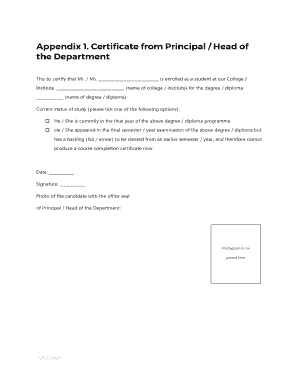
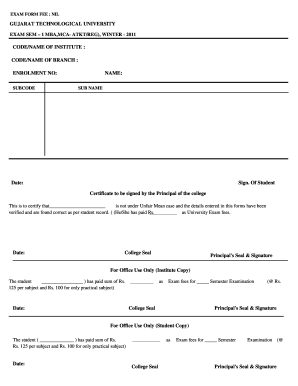
The Tuition Fee Form: Certificate from Principal is an educational document used by schools and colleges in India to certify a student's enrollment and payment of tuition fees.
pdfFiller scores top ratings on review platforms




Very easy to use and the forms look great!!
It was straightforward and easy to fill.
Who needs India Tuition Fee Form: Certificate from Principal?
Explore how professionals across industries use pdfFiller.

India Tuition Fee Form: Certificate from Principal is needed by:
-
Students requiring proof of enrollment
-
Parents confirming tuition payments
-
Schools and colleges for record-keeping
-
Educational authorities overseeing enrollment
-
Financial institutions verifying student status
-
Scholarship bodies evaluating applications
Comprehensive Guide to India Tuition Fee Form: Certificate from Principal
What is the Tuition Fee Form: Certificate from Principal?
The Tuition Fee Form, known as the Certificate from Principal, is essential for certifying a student's enrollment and confirming payment of tuition fees. This form plays a significant role in establishing a student's status within the educational institution and ensuring compliance with financial obligations. Completion of this form requires specific details and the principal's signature to validate the information provided.
Purpose and Benefits of the Tuition Fee Form
Completing the Tuition Fee Form serves multiple purposes. Primarily, it secures financial aid and confirms school enrollment, which is crucial for the student’s academic journey. Additionally, the form helps educational institutions keep accurate records, ensuring compliance with administrative rules and facilitating administrative tasks.
Who Needs the Tuition Fee Form: Certificate from Principal?
This form is primarily utilized by students, parents, and schools. Students may require the form for college admissions or transferring schools, while parents often need it to demonstrate their children's enrollment status. Schools, in turn, have the responsibility to provide this documentation accurately and timely as part of their administrative processes.
How to Fill Out the Tuition Fee Form: Online Instructions
Follow these steps to successfully fill out the Tuition Fee Form online:
-
Enter the student's name in the designated field.
-
Provide the class and academic year in which the student is enrolled.
-
Specify the fee payment period applicable to the tuition.
-
Ensure all fields required for completion are filled correctly.
-
Review the form for accuracy to avoid common mistakes.
Required Documents and Information for the Tuition Fee Form
Before starting the Tuition Fee Form, gather the following documents:
-
Proof of fee payment to accompany the form.
-
Student's enrollment certificate from the school.
-
Identity proof of the student and parent, if necessary.
Additional documentation may also be required based on specific school requirements, so it’s best to check with the institution beforehand.
How to Sign the Tuition Fee Form: Certificate from Principal
There are two main types of signatures for the Tuition Fee Form: digital and wet signatures. If a digital signature is used, ensure it complies with the institution’s protocols. Obtaining the principal's signature usually involves approaching them directly for verification. Some schools may also have notarization requirements, so check in advance to ensure all stipulations are met.
Submitting the Tuition Fee Form: Certificate from Principal
Once the form is completed, it can be submitted through various methods, including online and paper submissions. Identify the appropriate submission address and be aware of any deadlines to ensure timely processing. After submission, following up with the school may be necessary to confirm receipt and address any potential issues.
Security and Compliance for Submitting the Tuition Fee Form
When submitting the Tuition Fee Form, pdfFiller’s platform ensures that sensitive information is well-protected through 256-bit encryption. Their commitment to data protection complies with legal standards such as SOC 2 Type II, HIPAA, and GDPR, allowing users to submit documents with confidence in their confidentiality and security.
What Happens After You Submit the Tuition Fee Form?
After submitting the Tuition Fee Form, you can check its status with the school. The post-submission process may include receiving updates or requests for corrections if necessary. Understanding common rejection reasons may also help in preparing a renewal or resubmission process if the form does not meet initial requirements.
Leverage pdfFiller to Complete Your Tuition Fee Form: Certificate from Principal
Utilizing pdfFiller can greatly simplify the completion of your Tuition Fee Form. Its features allow users to edit, e-sign, and share documents easily. With user-friendly technology and ongoing support, pdfFiller facilitates a seamless experience in managing educational forms effectively.
How to fill out the India Tuition Fee Form: Certificate from Principal
-
1.To access the Tuition Fee Form: Certificate from Principal, visit pdfFiller's website and use the search feature to find the form by name.
-
2.Once located, click on the form to open it in the pdfFiller editor, where you can begin filling it out online.
-
3.Gather necessary information such as the student's name, class details, fee payment period, and the principal's signature before starting the filling process.
-
4.Navigate through the form using pdfFiller's toolbar, click on the fields to input your data, and ensure that all mandatory fields are completed.
-
5.After filling out the information, double-check entries for accuracy and ensure that the principal's signature field is ready for signing.
-
6.Review the completed form closely by going through each section to verify that all information is correct and complete.
-
7.To finalize, save your changes within pdfFiller. You can download the completed form directly onto your device or share it via email from the platform.

Who is eligible to use the Tuition Fee Form?
The Tuition Fee Form is intended for students enrolled in educational institutions in India who need to certify their enrollment and tuition payments.
What details are required to complete the form?
Essential details needed include the student's name, class, fee payment period, and the principal's signature to verify the information.
How can I submit the filled-out Tuition Fee Form?
You can submit the completed form either by downloading it and presenting it in person to the relevant authority or by using any online submission options provided by your educational institution.
Are there any common mistakes to avoid when filling out the form?
Ensure that all mandatory fields are filled, spelling of names is correct, and the principal’s signature is included. Omitting these may delay processing.
What is the processing time for the submitted form?
Processing times can vary by institution, so it is advisable to check with the school or college administration for specific timelines after submission.
Is notarization required for the Tuition Fee Form?
No, the Tuition Fee Form does not require notarization; it must only be signed by the principal.
What should I do if I encounter issues while completing the form?
If you face any issues, consult pdfFiller's support resources or your educational institution's administration for assistance with filling out the form.
Related Content
Related Forms






Related Catalogs
Get the latest insights from our blog


If you believe that this page should be taken down, please follow our DMCA take down process
here
.
This form may include fields for payment information. Data entered in these fields is not covered by PCI DSS compliance.